

The Outbox and approvals
Every outgoing email waits in the Outbox for your decision. Nothing is sent until you approve it.
Review the queue
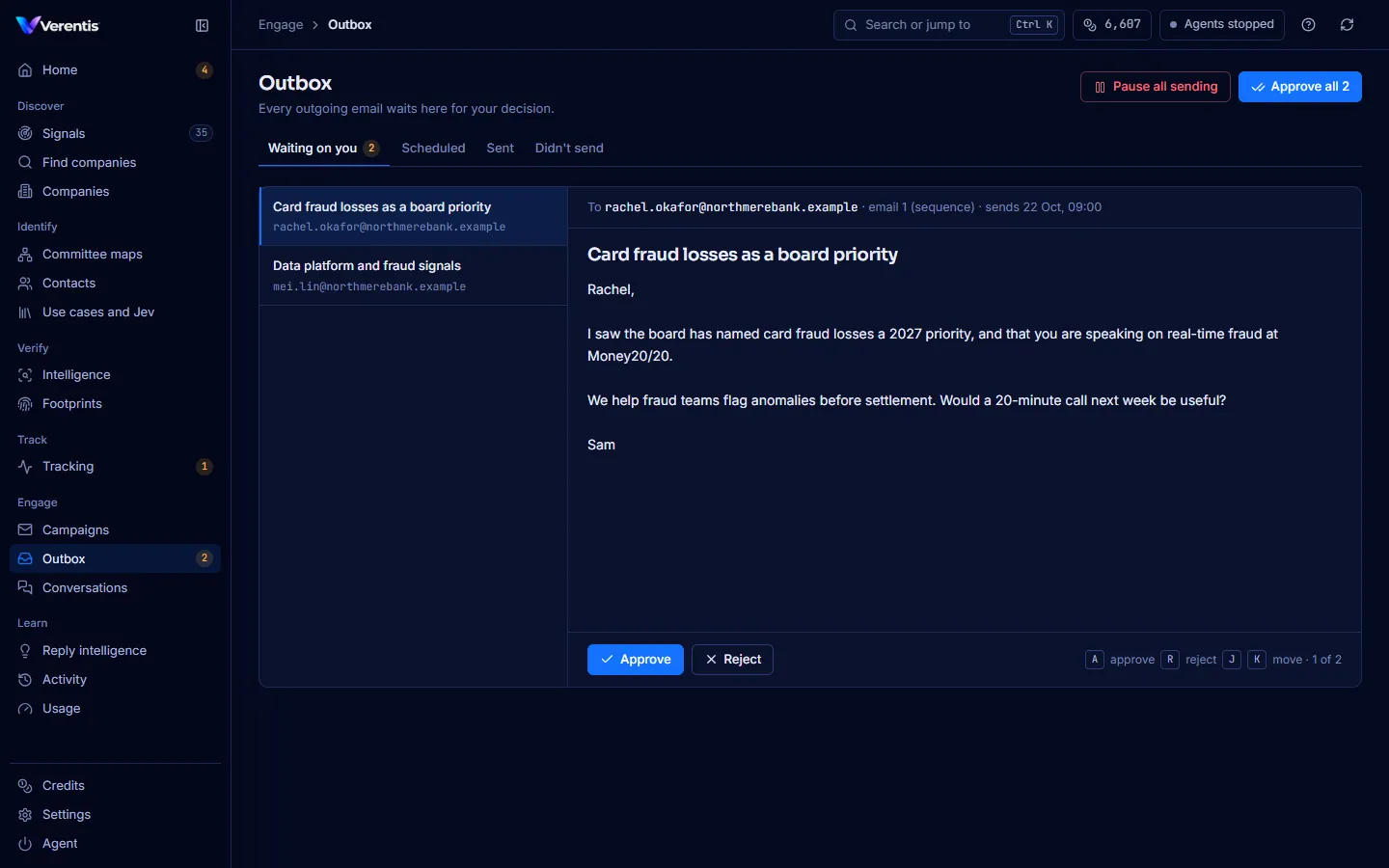
Section titled “Review the queue”- Open Outbox. The count in the sidebar is how many emails are waiting.
- The Waiting on you tab shows the queue on the left. The selected email fills the right: recipient, which step of the sequence it is, when it will send, then the subject and body.
- Press Approve to schedule it, or Reject to drop it.
- The next email opens automatically.
Keyboard
Section titled “Keyboard”| Key | Action |
|---|---|
| A | Approve |
| R | Reject |
| J / K | Next / previous email |
The desk shows one email at a time on purpose. A wall of drafts invites a single “approve all” reflex, which is the review this step exists to force. Approve all is there when you have read them.
The other tabs
Section titled “The other tabs”- Scheduled: approved and waiting for their send time. Sends are paced like a person would send them, within your daily cap and outside quiet hours.
- Sent: what has gone out.
- Didn’t send: anything the pre-send gate or the provider stopped, with the reason.
The pre-send gate
Section titled “The pre-send gate”Before anything leaves, a fixed set of checks (no model involved) blocks:
- unfilled merge tags such as
{first_name} - banned phrases and emails over the length cap
- too many links, or HTML bodies
- addresses that are not deliverable
- any mismatch between the recipient and the contact record
If a prospect replies, their remaining queued emails are cancelled.
Pause all sending
Section titled “Pause all sending”Press Pause all sending at the top right to stop every outgoing email immediately. The rest of Verentis keeps working. Press Resume sending to start again.
From the terminal: verentis sending pause, verentis sending resume and verentis sending status.
Campaigns
Section titled “Campaigns”Campaigns shows the sequences the Writer has drafted. Open one to read each email, and use Feedback for the Writer (“too long”, “wrong angle”, “missing proof”) to shape the next drafts. Every email still waits in the Outbox.
Conversations
Section titled “Conversations”Conversations shows every reply, how it was classified, and how Verentis responded. Replies drafted by Verentis also go through the Outbox.